

A complete, accurate profile is the foundation for getting listed on a wellness directory. Find the directory’s provider signup or profile-claim option, enter your practice details, and add a clear photo and concise bio before submitting. Include current contact information, the services you offer, and your areas of focus so potential clients can quickly understand who you help and how to reach you.
Directory forms often ask for more than a name and contact details. This guide explains how to get listed on a wellness directory, what to prepare, and how to choose a photo and write a bio that represent your practice clearly. It also covers reviewing your profile before it goes live and keeping details accurate as your practice evolves. A thoughtful listing gives potential clients a clear first impression while letting you choose what information to share.
Key Takeaways
- Start by finding the directory’s profile-claim option or provider signup process, then follow its steps to create or manage your listing.
- Prepare accurate contact details and a clear description of your specialties and services to help people understand your practice.
- Choose a professional photo and write a concise bio that reflects your approach and makes a welcoming first impression.
- Review your profile for accuracy and privacy before submission, and explore a practitioner directory listing when you’re ready to build your professional presence.
What Information Should I Include in My Directory Listing?
- Search for an existing listing first. Enter your practice name, provider name, and city in the directory’s search field. Check spelling variations too. If a profile already exists, use its claim option rather than creating a duplicate. A complete listing can help people discover your practice and understand its services.
- Review eligibility and credentials. What are the eligibility requirements for wellness directory listings? There’s no universal rule; each directory sets its own criteria for practice type, location, and profile content. Do wellness directories require professional licenses or credentials? Requirements vary, so represent your qualifications accurately and include credentials that apply to your practice.
- Choose a listing term and submit your business details. Some directory forms may present three-, six-, or twelve-month options; review the term, renewal conditions, and included features before choosing. Which wellness directories accept listings in the United States? Wellness.com is one directory with provider listings; check that its submission process accepts your practice details. Enter your practice name and contact information carefully.
- Complete the profile for local discovery. Add an office address, phone number, specialties, and services. Keep your practice name, address, and phone consistent with your Google Business Profile and other listings. How do I optimize a wellness directory profile for local search? Use the same business details and clearly name your location and services, such as “somatic bodywork in Austin.”
- Audit every field before submission. Compare the directory profile against your current business details, including office address, phone number, service descriptions, photo, and bio. How long does wellness directory approval take? Timing depends on the directory’s review process and whether the submission needs correction. Complete fields and readable details help prevent avoidable follow-up.
- Review privacy and payment terms. Before submitting, read the directory’s privacy policy and identify what information appears publicly. How can I avoid scams and misleading wellness directories? Look for clear ownership, transparent listing terms, and understandable renewal details. Pause if a form hides fees, pressures immediate payment, or requests sensitive information unrelated to a public profile.
Claiming or creating a provider profile
- Open the directory’s provider section. On Wellness.com or another platform, look for options such as “claim profile,” “join,” or “add a provider.” Choose the route that matches your situation. A claim request applies to an existing profile; a new listing starts a profile from scratch.
- Match the profile to your practice. For an existing listing, compare its provider name and practice details with your own records. Select the correct location when several profiles share a name. If the information belongs to another practitioner, don’t claim it; use the platform’s correction or support process.
- Set up an account you can manage. Use a professional email address you can access consistently. Create a strong, unique password and store it securely. If the platform sends an email confirmation, follow its instructions before continuing. Keep account access with the practitioner or staff member responsible for profile updates.
- Complete the claim or new-profile form. Enter your name, practice name, location, contact details, specialties, and services in the relevant fields. Use the same spelling across each field. For example, don’t alternate between a shortened practice name and its full business name.
- Provide requested ownership details. A directory may ask you to confirm your connection to the practice or provide supporting information. Respond only through the platform’s official form or account workflow. Review each requested field before sending, and avoid adding sensitive personal details unrelated to the listing.
- Save the submission and track its status. Record the platform name, submission date, and account email in your business files. Watch for messages requesting clarification, then respond through the account. Once access is granted, review the profile for changes. For practitioners preparing a public presence, a wellness practice profile can support a clear introduction.
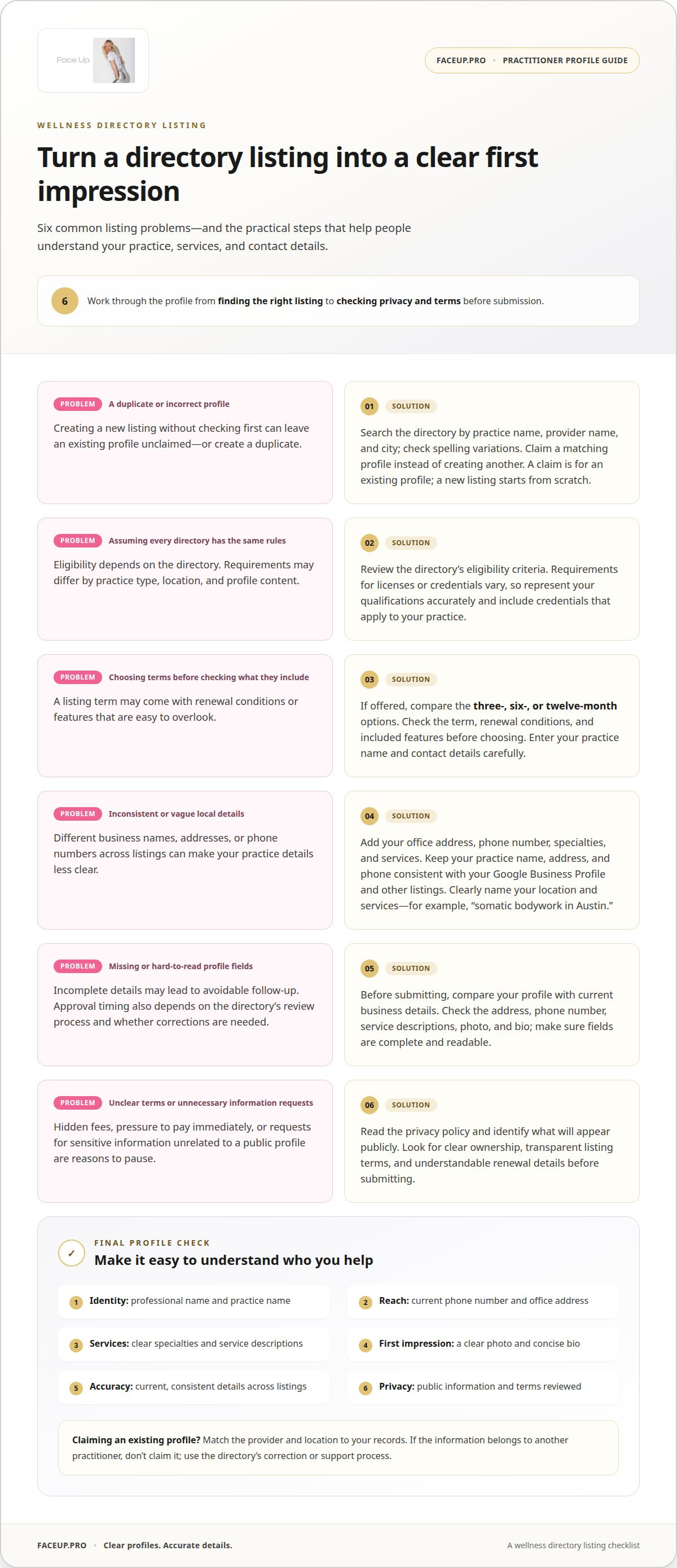
Information to include in a directory profile
- Give your practice a clear identity. Enter your professional name and practice name as you use them with clients. If you work under a studio name, include it consistently across the profile. A person searching for a named practitioner should be able to distinguish you from similarly named providers.
- Make contact details useful and precise. Add the phone number and office address clients should use to reach or visit you. For a practice with multiple locations, identify the address connected to each profile. Keep these details accurate so someone interested in your services can take the next step without confusion.
- Name your specialties and services plainly. Describe what you offer using familiar terms, then explain your approach briefly. For example, a facial sculpting practitioner might name facial sculpting and describe the focus of each session. Avoid broad labels alone; specific service names help readers understand whether your practice suits their needs.
- Include relevant professional credentials. Add certifications, qualifications, or awards that relate to your listed services. Use the credential’s full name and issuing organization, rather than unexplained initials. Keep the information factual and current. A directory profile should help readers understand your professional background, not imply qualifications you haven’t earned.
- Write a concise practice description. According to Wellness.com, a short description helps patients decide whether to contact a practice. Explain who you work with, what your services involve, and what a first interaction may focus on. Keep the wording direct, such as “I offer somatic bodywork focused on releasing tension.”
- Choose what appears publicly and review the profile. Reputable healthcare directories may let practitioners control which details are visible. Check the privacy settings before publishing personal information. Medical provider directories may also include patient reviews. Review your public profile as a reader would, confirming that your services, contact details, credentials, and description present a consistent picture.
Adding a photo and provider bio
- Choose a professional headshot. Wellness.com recommends adding a professional headshot to help patients decide whether to contact a practice. Select a recent image where your face is clearly visible. A simple background and even lighting keep attention on you. Wear clothing you’d choose for meeting a client, and avoid group photos, distracting filters, or images that don’t represent your current appearance.
- Check the image before uploading. Open the file on a phone and computer to see how it appears at different sizes. Make sure the image is sharp, correctly oriented, and cropped without cutting off your face. Follow the directory’s file and format instructions. If the platform displays a circular thumbnail, leave space around your head and shoulders.
- Lead your bio with your role. Start with your name, professional title, and main service. For example: “I’m Jordan Lee, a somatic bodywork practitioner offering sessions focused on releasing tension.” Use first person if it suits your practice, or write in third person for a more formal profile.
- Explain your approach in concrete terms. Describe the people you work with, the services you provide, and what clients can expect from an initial session. Keep each claim factual. Name relevant methods and qualifications accurately, and avoid guarantees or language that implies a treatment will produce the same result for everyone.
- Keep the bio focused and easy to scan. Use short sentences and familiar terms instead of unexplained professional jargon. Include a personal detail only if it helps readers understand your approach, such as why you focus on facial tension or body awareness. Remove repeated claims, promotional slogans, and details unrelated to your practice.
- Preview the finished profile. Check the photo, name, and bio together on the directory page. Confirm that the image looks professional beside your text and that the description matches your listed services. To shape a clear practitioner introduction, prepare your wellness profile with care.
Face Up: Practitioner Directory Listing
Face Up’s Practitioner Directory Listing is a next step for wellness practitioners who want a professional presence within the Face Up community. Prepare your profile, photo, and bio, then explore the listing if it fits your practice. If you’re interested in the Face Up approach, you can also explore Face Up Method Certification or the Jaw Release Course. Whichever path you choose, describe your services and qualifications accurately. A directory listing supports a clear introduction, but it does not replace the details people need to understand your practice. Explore the Practitioner Directory Listing with Face Up.
Let Your Professional Presence Grow With Your Practice
A directory profile is more than a one-time introduction. As your practice develops, update its public description to reflect the work you do now and the people you serve. Keeping your profile current helps your professional presence feel considered rather than static. The same care you bring to getting listed on a wellness directory can guide future updates: align your description with your current approach and goals.
Practitioners who want to deepen their connection with Face Up’s method can explore Face Up Method Certification, the Face Up App Subscription, and the Jaw Release Course. These offer distinct ways to engage with Face Up’s professional training and learning resources, alongside the Practitioner Directory Listing.
If you’re ready to explore the next step for your practice, contact Face Up to get started. Your professional profile can grow thoughtfully, one clear step at a time.
Frequently Asked Questions
How to get listed?
To get listed on a wellness directory, search for your practice before creating a profile. Claim an existing listing if it represents you; otherwise, use the directory’s provider signup process. Complete the submission and verification steps, then save confirmation messages with your business records. This makes it easier to track your listing and manage any follow-up from the directory.
What information do wellness directories require for a business listing?
Most profiles need enough information to identify your practice and describe its work. Prepare your business and provider names, contact details, specialties, services, and a short description. A directory may also request credentials, a biography, or a professional photo. Keep public profile details separate from account or verification information, and enter each in the appropriate field.
How do I submit a wellness business to a directory?
Use the directory’s provider signup or business submission form, selecting the option for a new listing if no profile exists. Enter details in the fields provided, review the submission summary, and complete any account confirmation requested by the platform. Keep a copy of what you submitted so you can identify exactly what to amend if the directory asks for a correction.
How much does it cost to list a wellness business in a directory?
Fees vary by wellness directory and listing option. Before paying, review the selected term, renewal conditions, and what the listing includes. Check whether optional upgrades are selected, and save the order details for your records. Compare the stated terms with your visibility goals before deciding.


